
Home / Product Selection / Energy / Meter Readings
-
How do I read my meter?
-
Each type of meter is read slightly differently.
Here is a guide to the different types of gas and electricity meters and how to read them:
On this page: Gas meters: | Electricity meters:

Gas meters
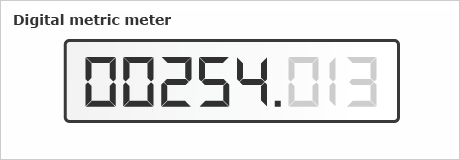
Meter reading is 00254. Write down the 5 numbers shown from left to right. Ignore the number(s) after the decimal point which may be shown
in red.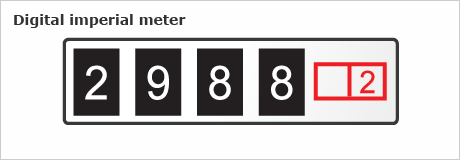
Meter reading is 2988. Write down the 4 numbers from left to right.
Ignore the number(s) shown in red.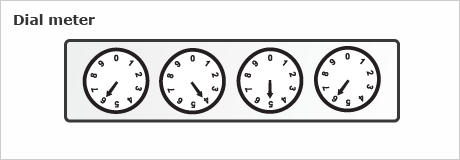
Meter reading is 6456. Read the 4 dials from left to right along the
bottom row only-ignore any others. Write down the number closest to
each pointer.Electricity meters:
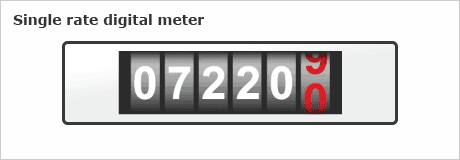
Meter reading is 07220. Write down the 5 numbers shown from left to right. Ignore the last number(s) which may be shown in red.
Meter reading is 56315, 27457. For both top and bottom rows, write down the numbers shown left to right. Ignore the last number(s) which
may be shown in red.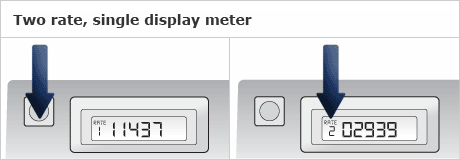
Some two rate meters only have one digital display and they either flash
up the different rate readings in a cycle or you need to press the button
to make the display cycle through the readings for each rate.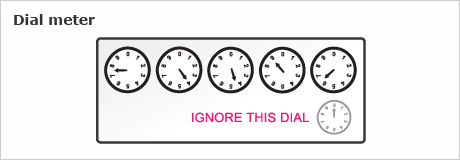
Meter reading is 74496. Read the first 5 dials from left to right, ignoring
the dial marked 1/10. Write down the number that the pointer has just passed - use the lower of the 2 numbers either side of the pointer.It's important to note that the sequence of numbers on each dial
alternates from clockwise to anti-clockwise.Submit your meter reading online
Take a note of the date you read the meter. Remember, if you give us regular readings when we ask for them, we won't have to send you an estimated bill.
Having problems with your meter?
If your meter has stopped or you're having other problems reading your meter, call us on 0800 048 0202*.
*Calls may be recorded and/or monitored for quality assurance and compliance purposes.
- View More: British Gas How do I read my meter?
- View Answer at https://www.britishgas.co.uk/HelpAndAdvice/LookUp/?SXI=13,CASE=1660
-
-
How often should I read my meter?
-
If you're a quarterly billed customer, we ask for a meter reading at least once a quarter. This is so we can send you an actual bill rather than an estimated one.
When we need a reading, we may email, text or phone you.
If you're on EnergySmart, we ask for a meter reading every month.
Submit your meter reading online
For safety reasons and as required by law, we will still send an authorised meter reader to inspect your meter from time to time.
- View More: British Gas How often should I read my meter?
- View Answer at https://www.britishgas.co.uk/HelpAndAdvice/LookUp/?SXI=13,CASE=5647
-
-
How to submit your meter reading
-
You can give us your latest meter reading:
- online
- using the British Gas iPhone app
- over the phone - in some cases our automated service will call and ask you to enter your meter reading
- by SMS (text)
Online:
If you have an online account:
- Log in to your online account
- go to submit meter readings and select the account(s) you wish to give a meter reading for.
- enter your reading.
Don't have an online account? You can still submit your meter reading online. Just enter your customer number(s) for your gas/electricity account(s) and your name, email address and phone number.
Alternatively, you can register for an online account now.
Using the British Gas iPhone app:
Download the British Gas iPhone app and follow the on-screen instructions.
Over the phone:
You can tell us your meter reading by using our 24 hour automated service on 0800 107 0224.*
By SMS (text):
You can submit your meter reading by text by replying to the text message we send you (we'll do this if you have already registered). If you haven't registered you can do so by calling us on 0800 048 0202* When we send you a text message just put the relevant letter in front of the meter reading you're sending us:
- G for gas
- E for electricity
Just joined British Gas? Submit your opening reading
Moving home? Submit your final meter read online
*Calls may be recorded and/or monitored for quality assurance and compliance purposes.
- View More: British Gas How to submit your meter reading
- View Answer at https://www.britishgas.co.uk/HelpAndAdvice/Solution/?solutionID=5496
-
-
How do you use my meter reading?
-
We use your meter reading to:
- work out your energy usage
- make sure your bills are accurate
- keep your Direct Debits accurate, if you pay by Direct Debit
Submit your meter reading online.
- View More: British Gas How do you use my meter reading?
- View Answer at https://www.britishgas.co.uk/HelpAndAdvice/LookUp/?SXI=13,CASE=3666
-
-
What happens if I can't give you a meter reading?
-
If we don't have an actual meter reading, we will estimate your bill. This estimate will be based on:
- your past usage
- previous meter readings
- the time of year
- View More: British Gas What happens if I can't give you a meter reading?
- View Answer at https://www.britishgas.co.uk/HelpAndAdvice/LookUp/?SXI=13,CASE=845
-
-
My bill is estimated but I'd like to give my own reading
-
If you provide us with an accurate meter reading we can amend your estimated bill.
Please note: we can only amend your bill up to 14 days after your estimated bill was issued.
If you're not sure how to read your meter find out more.
- View More: British Gas My bill is estimated but I'd like to give my own reading
- View Answer at https://www.britishgas.co.uk/HelpAndAdvice/LookUp/?SXI=13,CASE=771
-
-
Submitting your meter reading by text message
-
To be able to submit your meter readings by text message you will firstneed to register for this service. Please contact us on 0800 048 0202* to arrange this. We're open weekdays 8am - 8pm and Saturdays 8am - 6pm.
On this page: Gas meter reading | Electricity meter reading
For help on texting your meter reading, please follow our guide below:
It's free to send us your meter reading by text message. We will send you a text asking you to give us a meter reading when your reading is due.
Simply reply to our text message with your reading. You don't need to start a new text. If you have both gas and electricity with us, it's important you reply to each text message we send you separately.
Gas meter readingTo text us your gas meter reading, simply text G followed by the reading. So, for example if your meter reading is 00355, reply with G00355. We don't need your customer reference number or address in the text, but you should always reply to our message.
Find help on how to read your meter.
Electricity meter readingTo text us your electricity meter reading, simply text E followed by the reading. So, for example if your meter reading is 02039, reply with E02039. We don't need your customer reference number or address in the text, but you should always reply to our message.
Two rate digital electricity metersIf your meter has two rows of numbers, reply with your meter reading as D12345 for day and N12345 for night. So, for example if your meter reading marked 'normal', 'day' or 'rate 1' is 46043 and your reading marked 'low', 'night' or 'rate 2' is 32436 text D46043 N32436.
Find help on how to read your meter.
*Calls may be recorded and/or monitored for quality assurance and compliance purposes.
- View More: British Gas Submitting your meter reading by text message
- View Answer at https://www.britishgas.co.uk/HelpAndAdvice/LookUp/?SXI=13,CASE=1840
-
-
How can I get a smart meter?
- Due to the high volume of smart meters that need to be installed across Britain we'll contact you when it's your turn to receive a smart meter upgrade.
- View More: British Gas How can I get a smart meter?
- View Answer at https://www.britishgas.co.uk/HelpAndAdvice/LookUp/?SXI=13,CASE=3733
-
Where will my smart meters be fitted?
- In most cases, the smart meters will fit in the same location as your current meters.
- View More: British Gas Where will my smart meters be fitted?
- View Answer at https://www.britishgas.co.uk/HelpAndAdvice/LookUp/?SXI=13,CASE=3739
-
Will I get an in-home display monitor as well as smart meters?
- Yes, all our customers will get both.
- View More: British Gas Will I get an in-home display monitor as well as smart meters?
- View Answer at https://www.britishgas.co.uk/HelpAndAdvice/LookUp/?SXI=13,CASE=3751
